A team of agents. One inbox.
Alondra plans the work in parallel and brings you only the decisions.
brew install bitomule/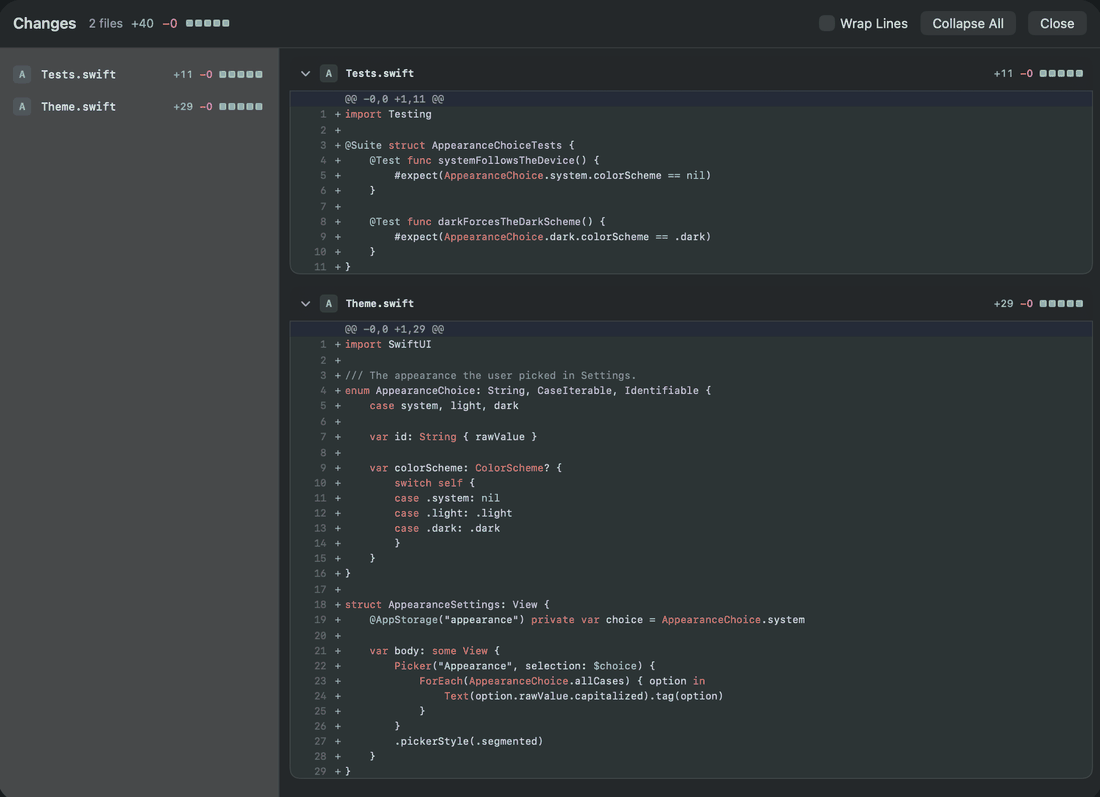
How Alondra works
You and the orchestrator decide. The nodes do the work, each on the model its task needs.
The orchestrator makes the plan.
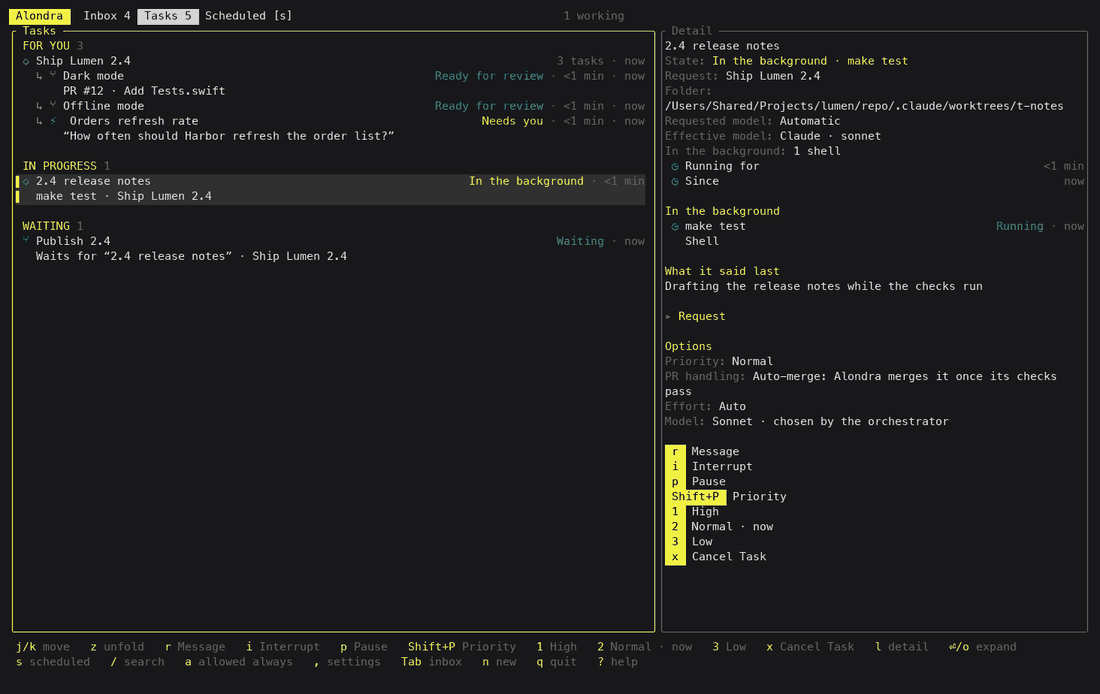
You write what you want, from the terminal app, the Mac app or the iPhone app. The orchestrator turns it into a plan and the plan into tasks. Only the orchestrator creates tasks.
Tasks wait for each other.
A task that depends on another starts once that one has landed. Tasks with nothing between them run at the same time, as many as your Mac has room for.
Each task gets its own model.
The orchestrator picks Claude or Codex, the model and the reasoning effort for each task, and writes down why. You can connect several accounts of each provider: Alondra runs each task on one of them and passes over any whose plan has run out.
Only decisions reach you.
You never read the agents’ conversations. Each task shows what its agent is doing and the last thing it said, and whatever needs you arrives as a card.
Deciding and doing stay apart.
You and the orchestrator decide what gets built. Each node, one agent session in its own git worktree, only does its task. It cannot create tasks; it can only suggest one to the orchestrator.
A decision, end to end.
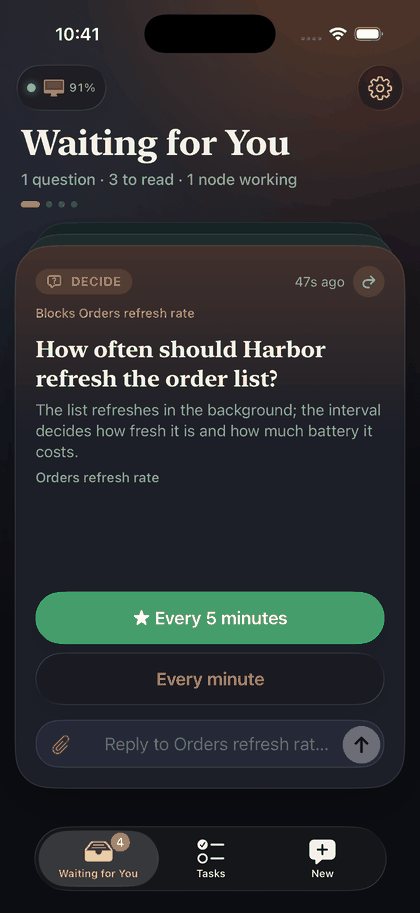
A card is one thing: a question with answer buttons, a plan to approve, a permission or a pull request to review. It carries its own context, so you decide without opening anything else.
- An agent has a question. The card appears in the terminal app.
- The same card reaches your iPhone.
- You tap an answer.
- The answer goes back to the agent, which carries on.
The iPhone notifies you. A question’s answers also appear on its notification, and answering from there needs the phone unlocked. How the inbox works
Review the diff where you are.
A pull request card opens its changes, file by file, in the iPhone and Mac apps. Tap or click a line to comment on it, and your comments go back to the agent when you request changes. The card shows how the checks went.
In the terminal the diff opens in tuicr, which Homebrew installs with Alondra. When you accept a delivery, Alondra merges the pull request and removes the task’s worktree.
Away from your desk, nothing to set up.
Pair your iPhone with your Mac once, in person. From then on it reaches your Mac directly when the network allows it, and through the Alondra Cloud relay when it does not. There is no Tailscale, no VPN and no port to forward. Requests and answers are sealed on one device and opened on the other, so the relay carries bytes it cannot read.
- A direct connection, when the network allows it.
- Through the relay, when it does not.
- Pairing and push. No task content goes this way.
- A sealed envelope. The relay passes it along and cannot open it.
What else is different
The work stays on your Mac
The daemon, your repositories, your worktrees and your Claude and Codex logins stay on your Mac. Alondra Cloud only connects your devices.
Metrics for every task
Settings › Metrics on the iPhone and the Mac shows how your tasks went, by model and by project: how many were done with no rework, how long they waited for you, and the provider’s estimate of what they cost. The orchestrator reads the same numbers when it picks a model.
Your choice of model wins
Set the model and the effort of a task yourself and the orchestrator keeps them. A decider that learns from past results is coming soon.Coming soon
More than one Mac
Pair your iPhone with each of your Macs and switch between them. Using several at once from one screen is coming soon.Coming soon
MCP servers in one place
Settings lists the MCP servers your agents use, project by project, with their status. Authorizing a server from a device other than the Mac is coming soon.Coming soon
Alondra Cloud is by invitation.
Alondra runs on your Mac without an account. Alondra Cloud, which connects your iPhone to your Mac with accounts, pairing, push notifications and a relay, is invitation only for now. An invitation lets you create your account.
To ask for one, leave your email. Invitations go out by email in small batches. Your agents, your code and your tasks stay on your Mac. Teams are coming soon.
The source is there to read.
Alondra is released under the Elastic License 2.0. Use it, copy it, change it and share it. You may not offer it to others as a hosted or managed service.